Once a picture has been saved it may be linked to other records in NFIRS 5 Alive. Select a linking option from the drop-down linking field.
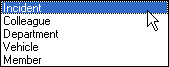
Notice a picture can be linked to any Incident, Colleague, Department, Vehicle or Member. When you select a link you will see a search screen that allows you to locate a specific record. You will then be able to view the linked photograph within the record you selected.
Linking is a powerful tool. You can link multiple pictures of an incident to an incident record. You can link pictures from your network of fire officers directly to the record of the colleague sending you the photograph. You can assemble a great database of fire station photographs by swapping pictures with Colleagues throughout the country.