Like Presentations and Pictures NFIRS 5 Alive provides a list of options for each document you save.
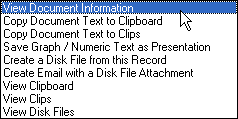
You can "View Document Information" including the fire department, create date and create time as well as a description of the document.
If the document is a small text document (< 30K) you can choose to "Copy Document Text to Clipboard" or "Copy Document Text to Clips". This option will work for any NFIRS 5 Alive graph or numeric you have saved as a document.
If you have saved an NFIRS 5 Alive graph or numeric array as text you have the option of restoring the report to Presentations using the "Save Graph / Numeric Text as Presentation" option.
Documents can be converted to disk files by selecting the option to "Create a Disk file from this Record". You will be able to select a folder destination and name for your new document.
If you wish to send a disk file of your document to a colleague in your professional network select the "Create Email with a Disk File Attachment" option. This works like similar options in Presentations by prompting you for a file name, folder destination while allowing you to enter email information in the NFIRS 5 Alive Email Editor.
You may also view document data using the "View Clipboard" or "View Clips" options. Or, view saved documents using the "View Disk Files" option.