If you press the "Compact" button you will see a file dialog appear.
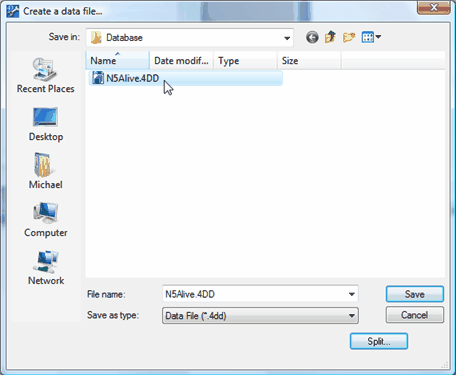
Here you are compacting the current data file (N5Alive.4dd). The original data file is not changed in any way. The file navigation dialog is telling you 4D Tools is creating a NEW compacted data file that has the same name as the original data file EXCEPT a "2" has been added to the title to indicate it's the new data file. By default the new data file, N5Alive2.4dd, is saved into the N5Alive folder next to the original data file, N5Alive.4dd.
Press the "Save" button to compact data in the original data file into the new compacted data file with the extra "2" in the title.
When 4D Tools has completed the Compaction of data quit 4D Tools. Open the "Database" folder inside the N5Alive folder. Here are key N5Alive files in the folder.
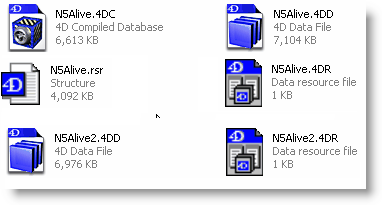
N5Alive.4dc is the database "structure" file you opened with 4D Tools
N5Alive.rsr is the "resource" folk for the structure file and should remain next to the
.4dc file.
N5Alive.4dd is the original "data" file which remains unchanged after you have run 4D Tools Compact.
N5Alive.4dr is the original "resource" folk for the data file and should remain next to the .4dd file.
N5Alive2.4dd is the new data file created with 4D Tools. It will not be used until you
change it's name to the name of the data file which was used the last time your ran N5A.
N5Alive2.4dr is the new data resource file created with 4D Tools. It will not be used until you
change it's name to the name of the resource file which was used the last time your ran N5A.
After running 4D Tools Compact you must remove the original data file (.4dd) and the original data resource file (.4dr) from the N5Alive folder. This will allow you to rename the new N5Alive2.4dd to N5Alive.4dd and N5Alive2.4dr to N5Alive.4dr. Removing the extra "2" on both files will ensure the next time you start N5Alive you will be using the newly "compacted" data files and not the original data files.